
Run agents from your phone
AI is supposed to give you time back: now agents work in my business without me baby-sitting from my laptop.

At 4:30am my social media agent scrapes my competitors for outlier content and grabs me the latest AI news.
At 5:00am there’s a message on my phone, briefing me on trending topics and some content ideas.
I get up, grab a coffee and at 8:30am my PA agent gives me a run down on my calls and what I need to know.
My billing agent runs an invoice sweep at 10:30am and drafts any chasers so I can polish and send.
1:30pm I get a message from my lead follow-up agent telling me which leads need a touch-point and drafts the emails, ready for my once-over.
I don’t need my computer for any of this.
Oh yeah, shouldn’t forget the roadmap agent who puts together the tailored AI business integration roadmaps for my fresh leads coming in.
This is how SMBs should be leveraging AI in 2026. And if you’re a business owner, here’s a shocking stat that’ll really illustrate the gap between where you can be vs. where most businesses are:
88% of businesses say they’re using AI, but less than 10% have successfully deployed agents running anything1.
That’s raw competitive advantage being left on the table.
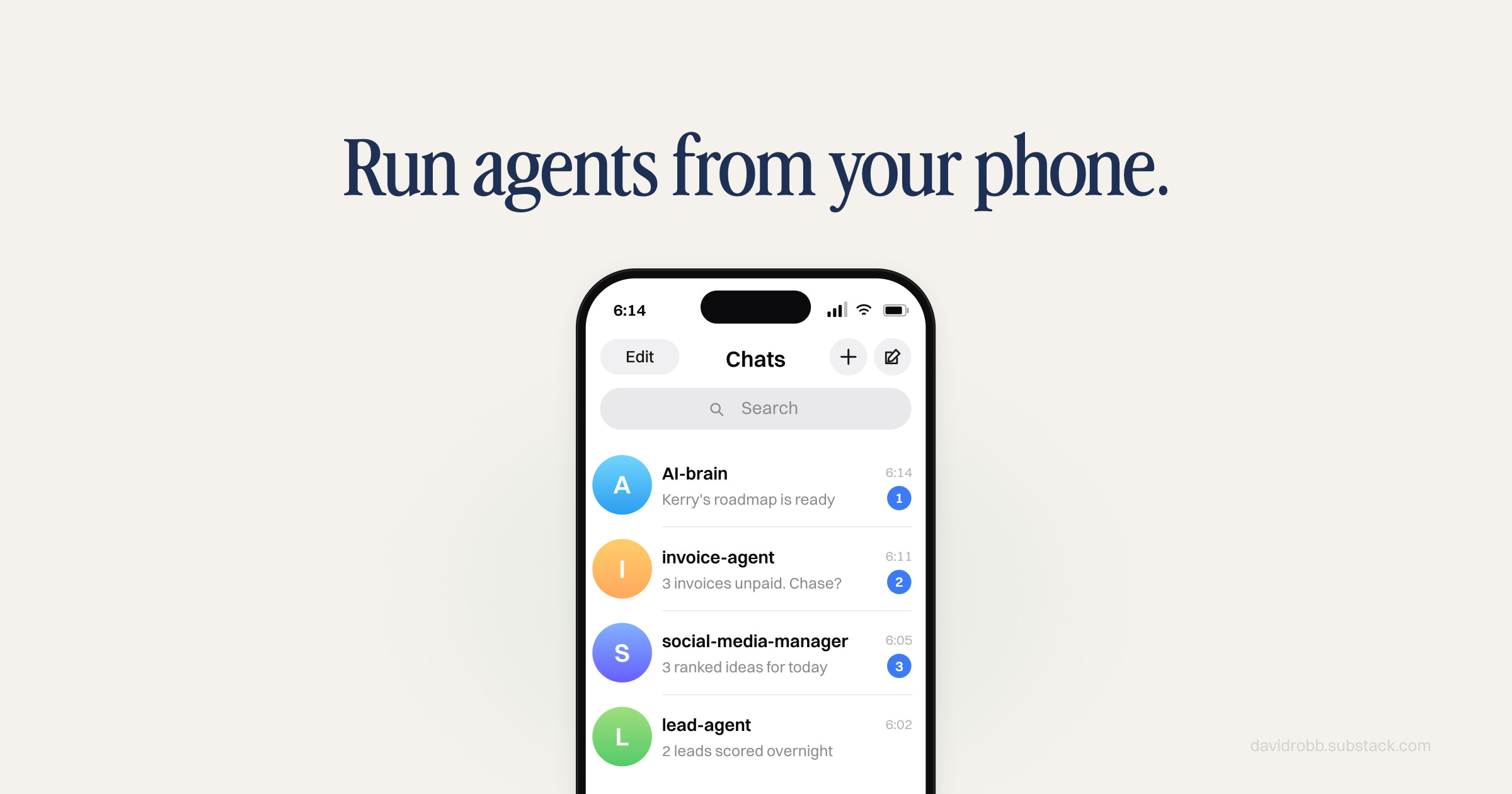
How to run agents from your phone
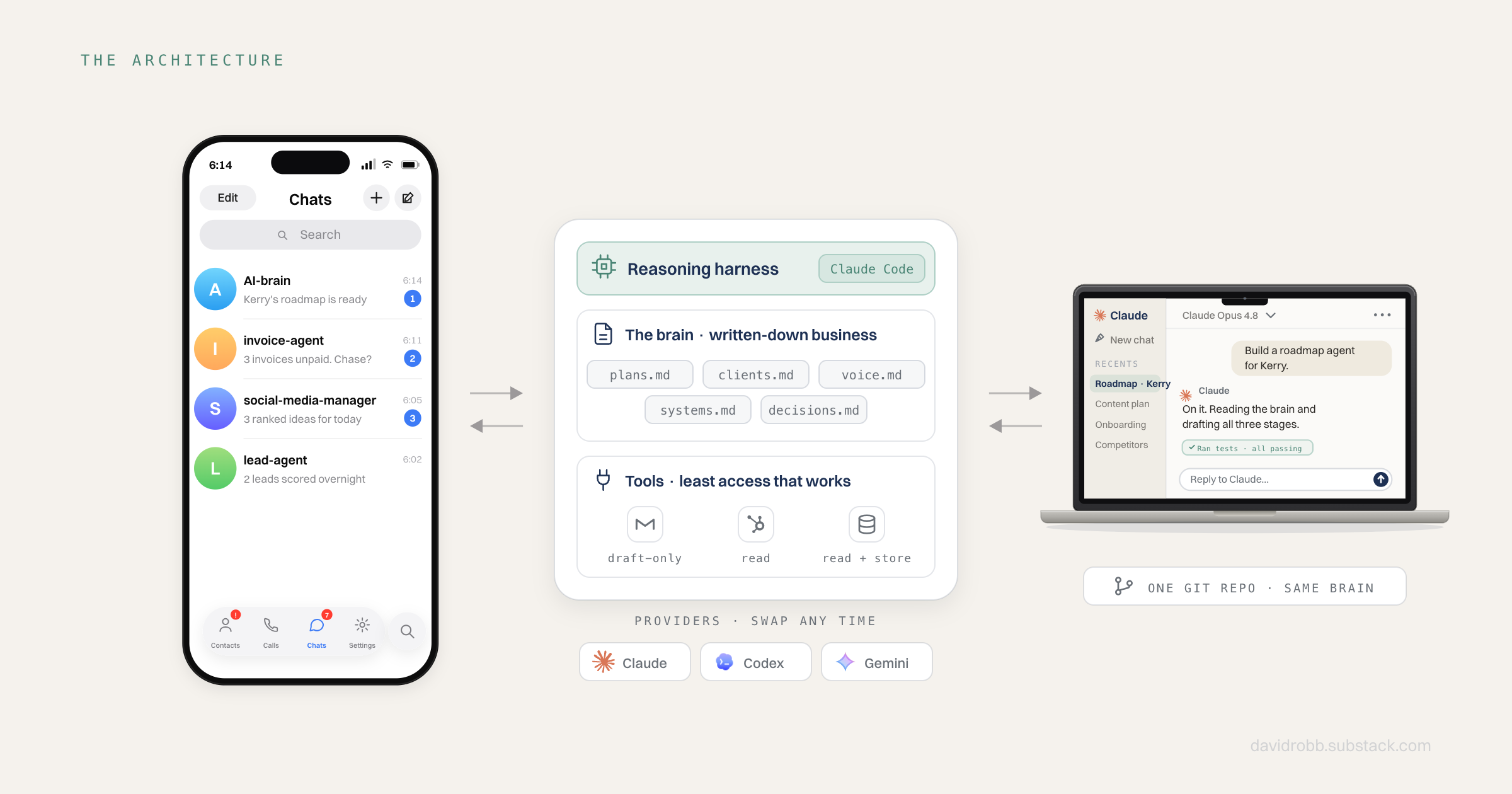
An AI brain in your business is actually four things stacked on top of each other:
A context layer. Your business, written down as plain files that AI uses to know what’s going on: plans, clients, brand voice, decisions, systems. The brain.
A reasoning harness. An AI agent (I use Claude Code) that sits on top of those files, reads them, and acts.
A line to your phone. So you can reach it with your laptop closed. Mine is Telegram.
Tools. Carefully limited connections to real systems: CRM, email, project boards, databases. Risk is mitigated by the tool constraints.
The AI promise of giving you time back with elegant solutions is here; this is where I’m putting my flag in the ground.
What makes me so confident about this specific set up is that it resolves the tension I carried in enterprise data consulting, which is the same tension businesses now carry with AI.
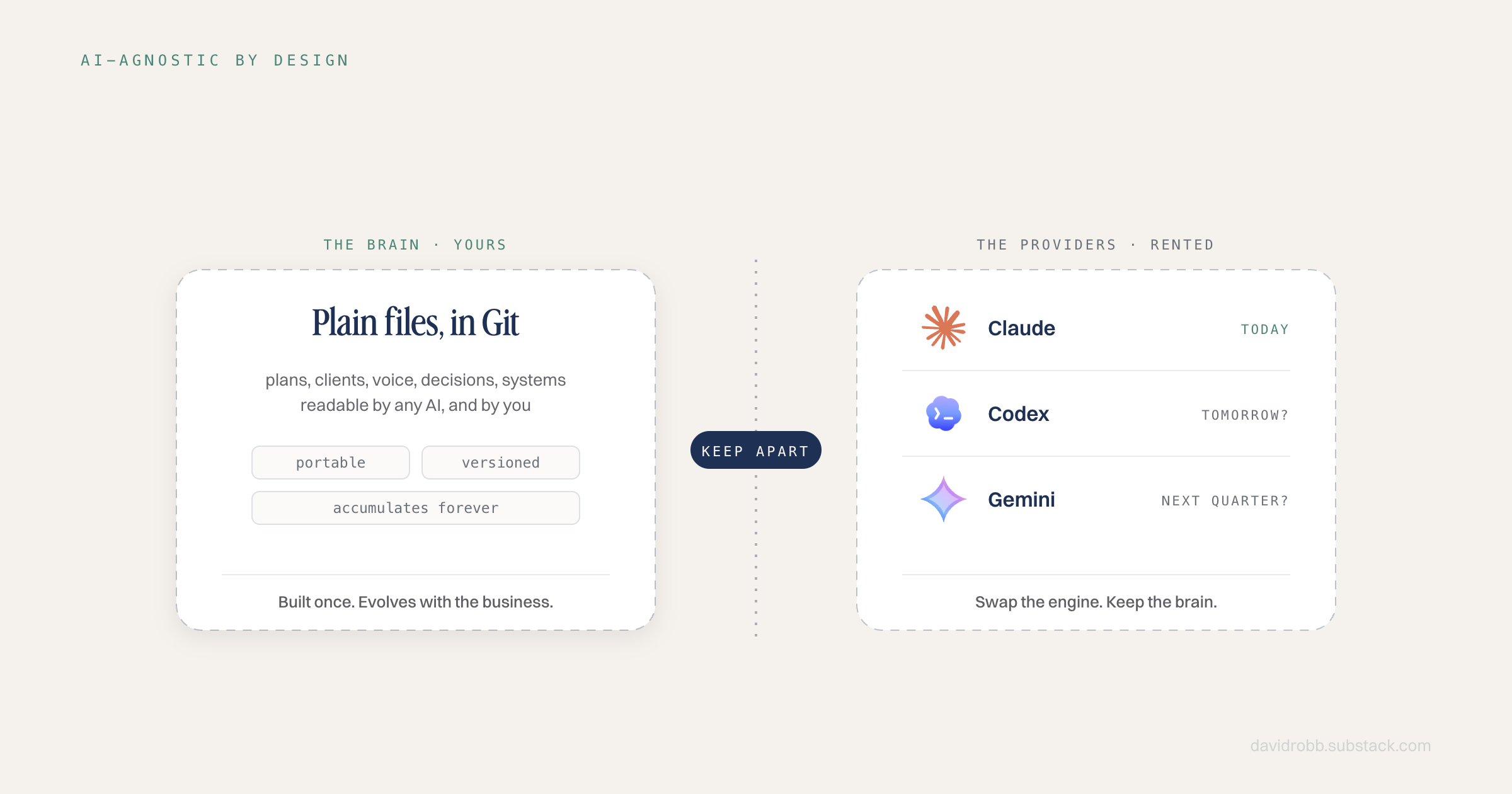
This solution is AI-agnostic: but the industry has a lock-in problem
In one industry survey, 81% of enterprise leaders said they’re worried about depending on a single AI vendor. I’d go further:
No one wants their business being held hostage by an AI provider.
Only 6% believed they could switch providers without serious disruption.
Given how quickly we’re moving from Claude, to Codex, to Gemini, to whoever’s winning the race next quarter… well, why wouldn’t you always want the latest and greatest for your business?
But none of the big players can fundamentally solve this problem without eating their own lunch.
Good business is built on repeat customers, and they’re all fighting for your allegiance. You don’t have to give it to them if your infrastructure is built to switch by design.
The fix is almost boring, because it’s architectural:
Keep the brain that runs your team of AI agents separate to the AI providers. Church and state.
A quick callout for the business owners reading:
Enterprise implementations face serious constraints that SMBs don’t have to deal with: procurement, compliance, integration reviews that run for months…
This is exactly where small business has the competitive advantage.
You can get a first version of this stood up in a weekend, iterate in tight cycles, and be running agents from your phone – while the big dogs are still meeting about which vendor they want to lock-in with.
Speed is the SMB superpower here. This is how you use it.
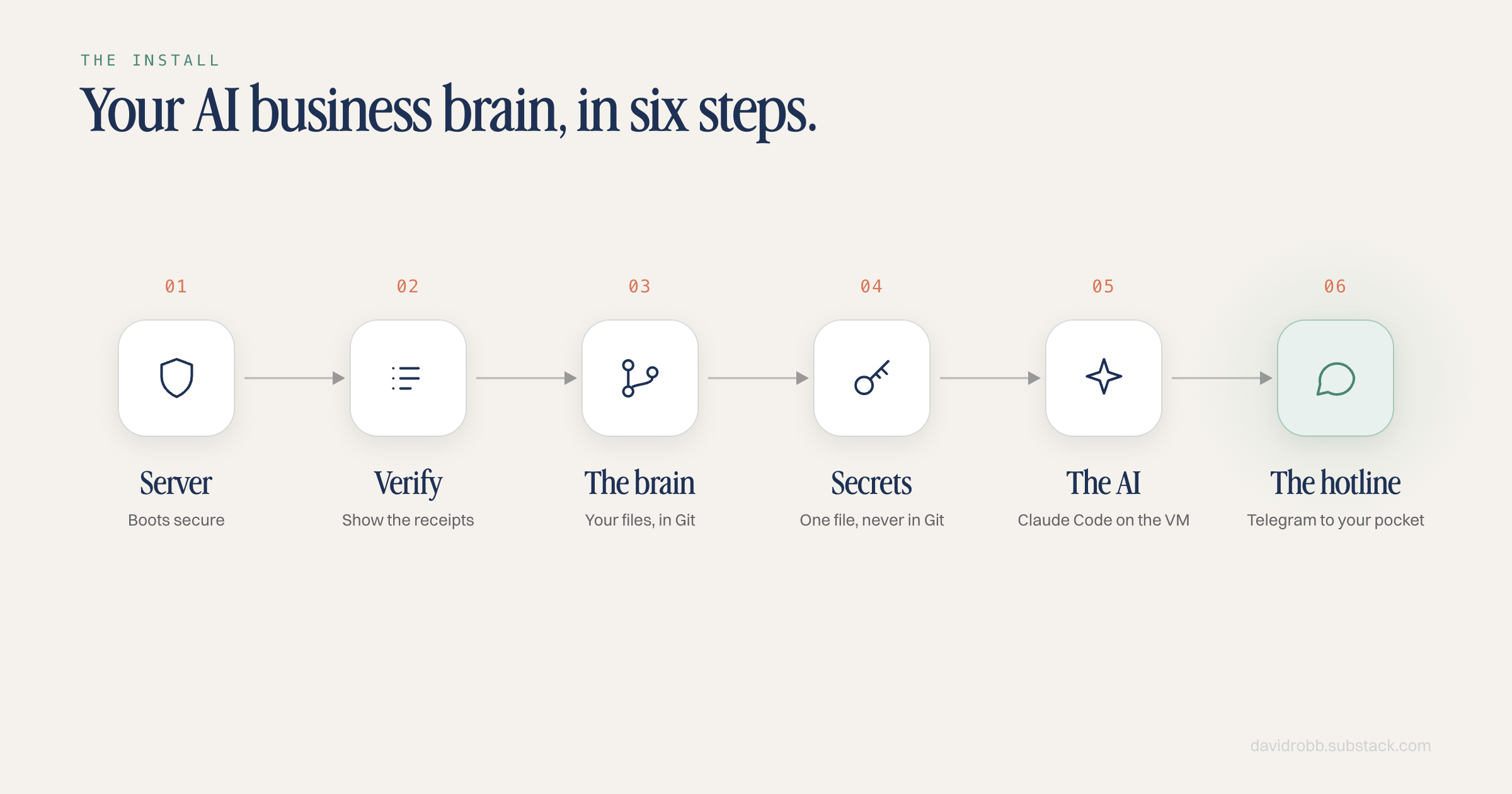
How to install your own AI brain in 6 steps
Let’s start with the tech stack, because it’s almost offensive how little this architecture adds to your monthly AI bill:
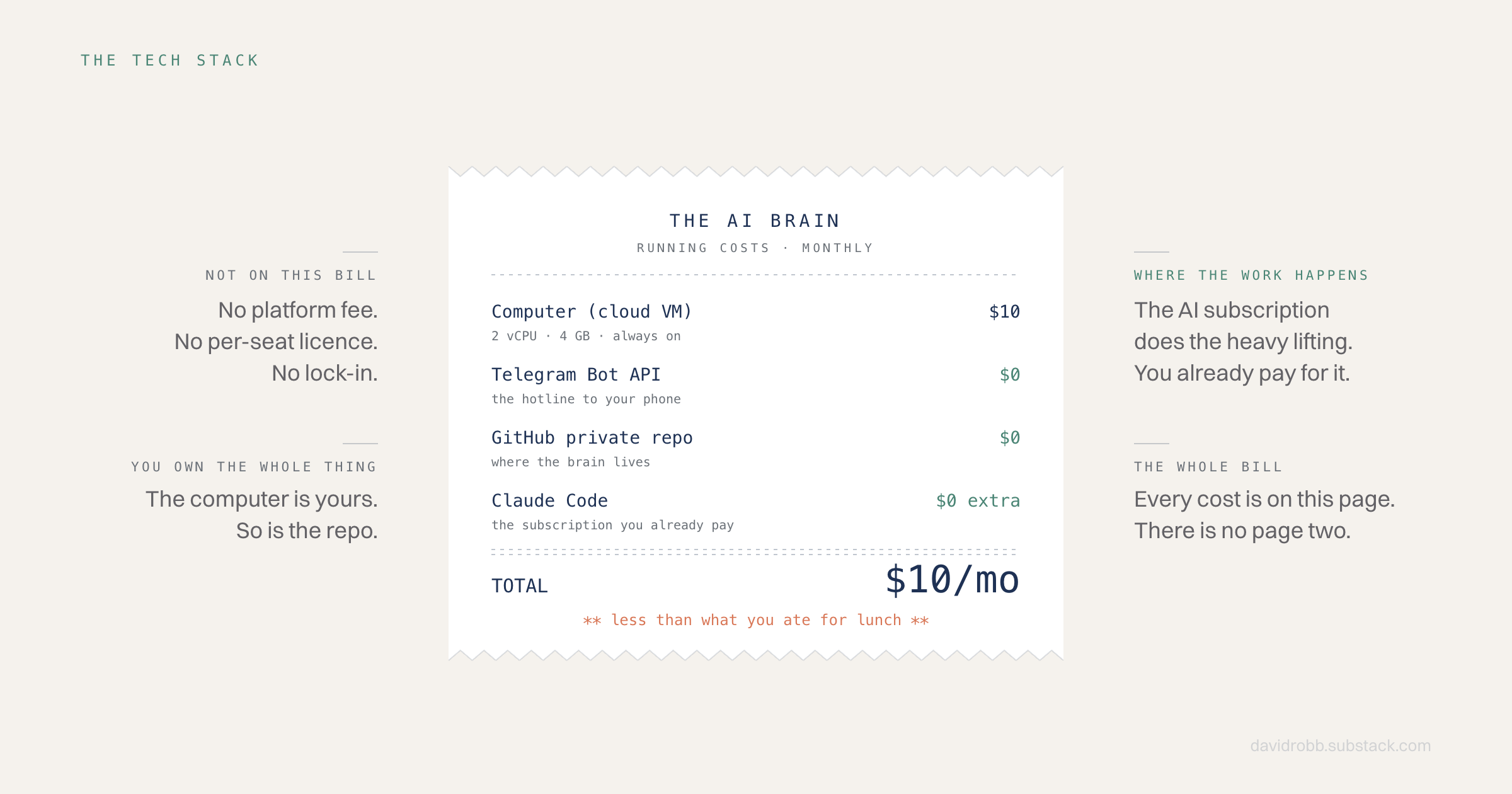
Total running cost: less than what you ate for lunch today + the AI subscription you’ve already got.
Heads up: you can get this phone-managed setup done in a morning. Building, testing and deploying the agents running on it is where the real work and value comes from.
We’ll hold off on the agent builds because they need their own write-ups (coming), but if you work through this, you’ll have the infrastructure to install your mobile agents on top. Then they run forever.
The agent model: build local, run remote
Once you’ve got your AI brain living in the cloud, you need the phone-managed agents running on it so we’ll cover that off quickly and then the full picture comes together fast.
This is my Fable-sprint pièce de résistance, which is also my core consulting offer moving forward.
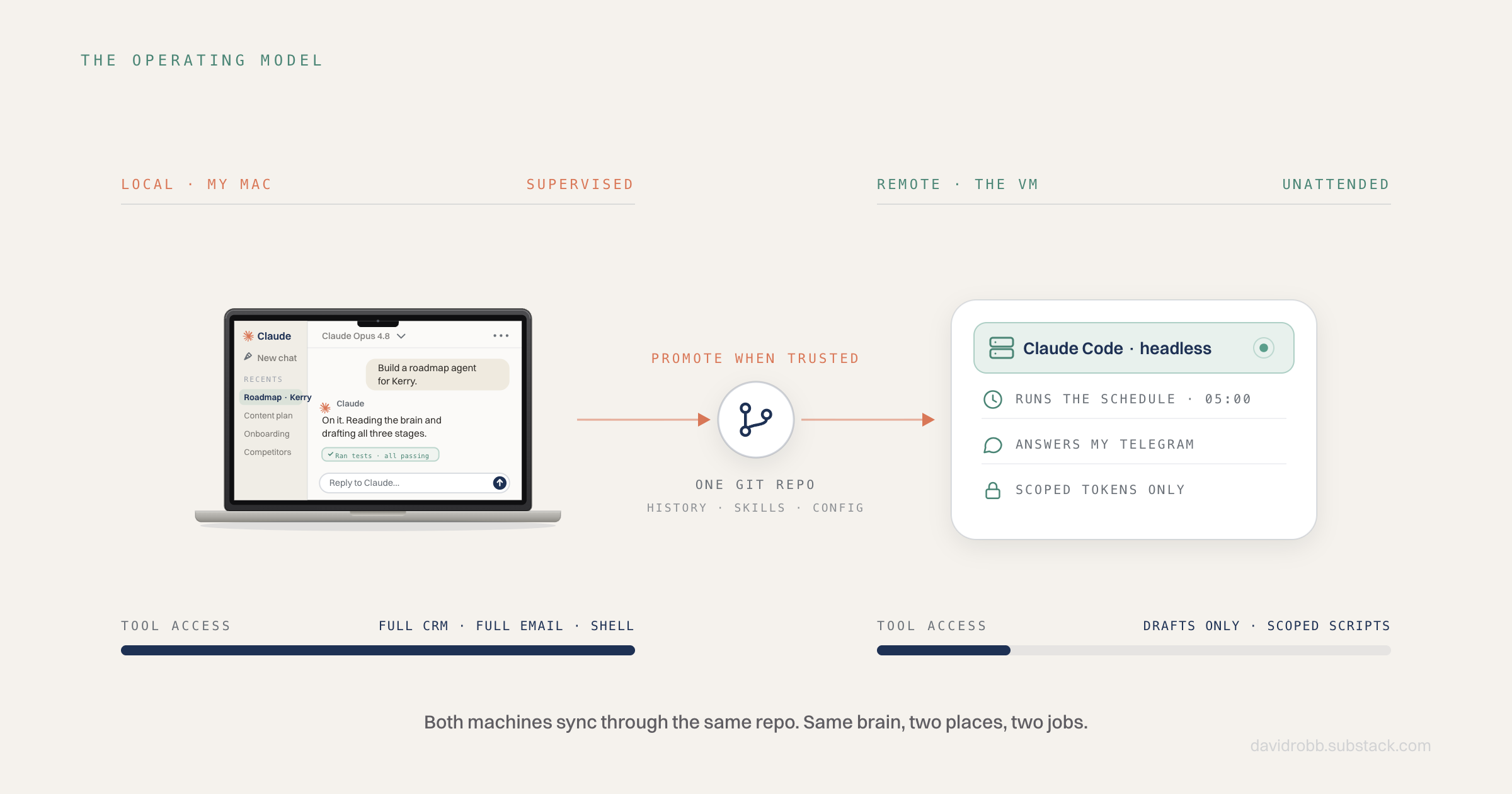
There’s a two step process to rolling out new agents and this is what it looks like for me:
Local (my Mac), where the thinking and building happens. New agents get designed, built and tested here → I’m monitoring every step. The local machine has the widest tool access because the risk lives with me, not the AI.
The VM (computer in the cloud), where the agents get independence. Once something works locally, it gets rolled out to the server and put on a schedule or triggered by a message from my phone.
This is where we mitigate the risk: the VM gets the narrowest tool access, because nobody’s watching it.
The brain-sync: GitHub
If you don’t know what GitHub is, for our purposes it’s basically how we update our brain.
A file gets created on either your VM or your computer.
The file uploads to GitHub.
That file gets downloaded to both places.
When you create a new file for your brain, or a new instruction for your agent, you set up the synchronisation on a timer (say, every half an hour).
Both machines sync through the same Git repo (the project), so they’re always working from the same brain.
This part needs a call-out: if you set it up private, it’s private. No one else can see it or make any changes to it. It’s 100% secure, and used by the biggest companies in the world.
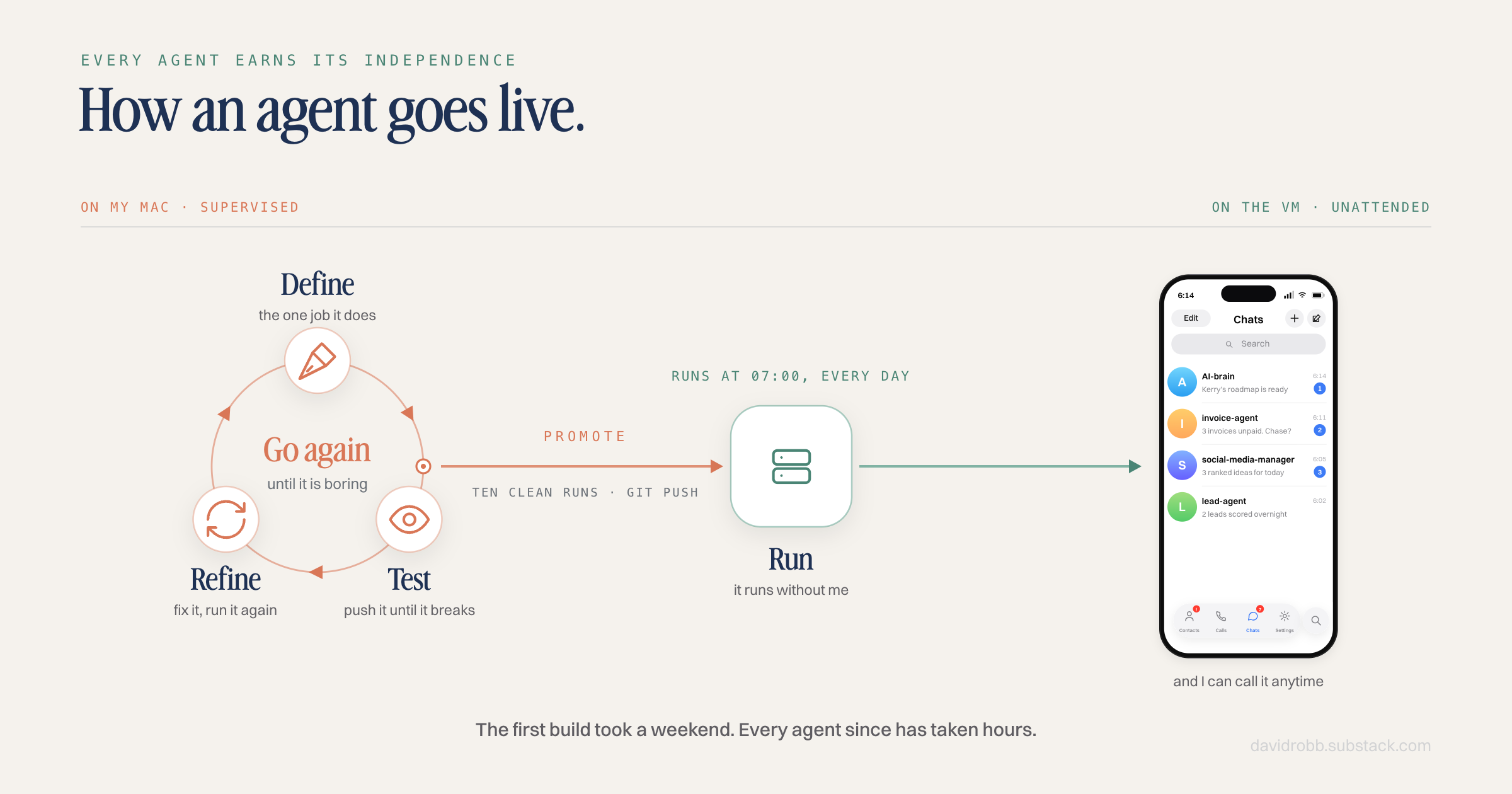
The loop I’m running my business on now:
Build the brain (covered below).
Roll out agents.
Keep adding use cases as the business surfaces them.
Test each one locally, supervised, until I trust it.
Promote it to the VM to run on its own.
That’s it. My beautiful team of phone-managed agents (and yours too, post-install).
The brain is the platform; the use cases compound on top.
The build, step by step
Alright, let’s get this thing up and running.
Use an AI like Claude or Codex to walk through the steps below. It’ll take care of all the technical parts and you just manage (glimpse into the future). If you’re using Claude, I’d suggest Fable for planning and then Opus/Sonnet subagents for the deploy.
Pro-tip: ask Fable to put the plan together specifically with the subagent roles built in. Much more token-efficient.
1️⃣ Step 1: a server that boots secure.
Don’t set up a server and secure it later. Cloud providers let you hand over a first-boot script, so the hardening is baked in before you ever log in:
I was going to go with Amazon/AWS originally, but went with Hetzner in the end because it’s still top-tier, just without the branding and associated price tag.
Take your pick, either works well.
Write a cloud-init file for a fresh Ubuntu 24.04 VM. Non-root sudo user, key-only SSH using this public key, firewall denying all inbound traffic except SSH, fail2ban, automatic security updates, 4 GB swap. I want the box hardened at first boot, not after.2️⃣ Step 2: verify, don’t trust.
One prompt to make the AI you’re using show you the receipts:
SSH into the new VM and verify the security posture. Check that root login over SSH is disabled, password authentication is disabled, the firewall only allows SSH inbound, and fail2ban and automatic updates are running. Show me the actual command output for each, not a summary.3️⃣ Step 3: put your brain files in Git.
Get your company brain/context files uploaded to a private Git repo that acts as the shared brain between your local computer and your VM.
This is the step where we create your AI brain that your agents operate from.
Create a new private Git repository for my AI brain and push it to GitHub. It holds three folders: my brain files, my knowledge files, and my company knowledge files. The repo must be private, confirm that before pushing anything. Then set up two-way sync between my local machine and the VM: both sides pull before doing any work and commit-and-push after any change, so either machine can always pick up exactly where the other left off. One writer at a time, and if there's ever a real merge conflict, stop and flag it to me rather than auto-merging.4️⃣ Step 4: one secrets file (never in Git).
Important security thing: every token and key your agent-team needs lives in a single file on the server that only your AI brain user profile can read, loaded by the agents that need it.
⚠️ Important: nothing secret should ever enter the Git repo.
Set up a secrets file at ~/.config/ai-brain/secrets.env with 600 permissions and wire the services to load it. Confirm the repo can never accept a .env file, and add a pre-push hook that scans every commit for leaked secrets.5️⃣ Step 5: the AI on the server.
Install Claude Code on the VM and authenticate it with a long-life token generated on your own machine.
It’s running on the subscription you already pay for. If you ever need more juice later you can just set up a new one for your VM.
Just ask Claude to run this for you, honestly. Shoot from the hip.6️⃣ Step 6: the hotline.
A small Python bot connects a Telegram chat to the AI. Your steps first, then the AIs:
Download Telegram on your phone and sign up with your number.
Create your bot. In Telegram, search for @BotFather (I know, very cool ha ha) – you’re looking for the one with the blue verified tick. Hit Start, then send a message “/newbot”. It’ll ask you for a display name and a username, then hand you a bot token (a long string of letters and numbers). That token IS your bot. Treat it like a password.
Put that token in your secrets.env file (from step 4), then give Claude this instruction:
Write a Telegram bot in plain Python that long-polls (no webhook, no open port), checks every message against a hard allowlist of chat IDs, refuses and logs everything else, and treats an empty allowlist as full lockdown. Run it as a system service that loads secrets from the environment and restarts on failure.Message the bot, it pulls the latest brain from Git, reasons, replies. We care about security a lot, so it’s worth understanding two key decisions inside that prompt:
Long-polling means the server only ever makes outbound calls (the chat is two-way, but no connection ever comes in, so there’s no door on the internet to attack).
The allowlist means the bot only ever acts for my Telegram ID. Everyone else gets refused at the door (and logged).
How secure does that leave things? There’s no anonymous way in.
Someone would have to steal one of my actual keys first (my phone, my laptop, or my GitHub account), and each of those has its own locks.
Everything the AI does lands in Git, so even a bad-tweak day is revertible.
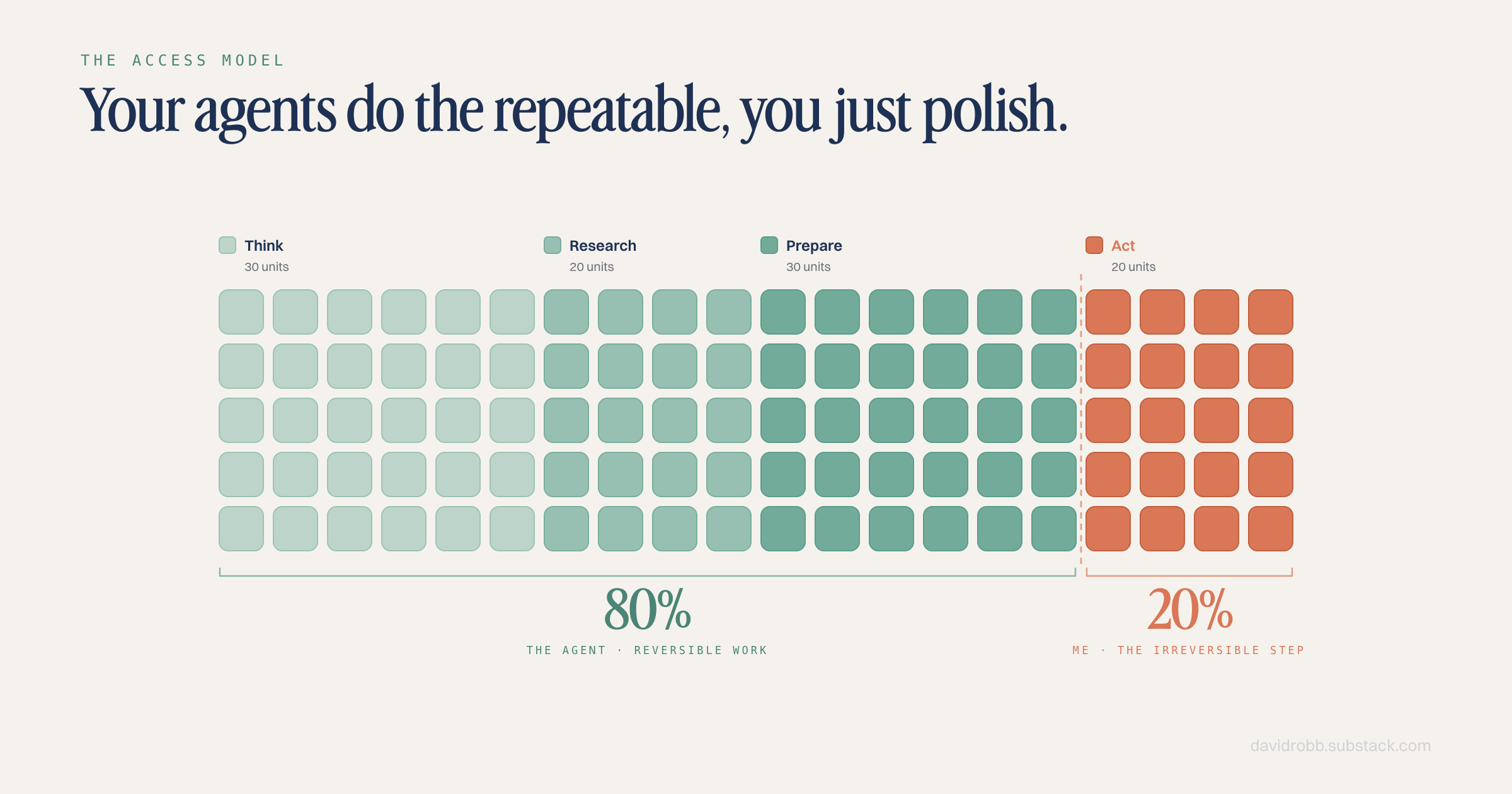
Adding your agents: the access decision
Here’s the mental model for the agents you roll out once you’re done with the base build:
Every new agent is an access decision. “I want an agent that does X” always leads to “something with this access, triggered this way.”
Four questions you should ask yourself for every agent you want on your team:
Who pulls the trigger? Me at the keyboard, me via the phone, or a clock with nobody watching? Less supervision means less access, as a rule of thumb.
What does it need to read? Knowledge (your .md files), tools (HubSpot, Stripe, Gmail etc.).
What does it need to do? Split into reversible (write a file, create a draft, add a card) and irreversible (send, publish, delete, spend).
What’s the worst-case mess if it’s wrong? If the answer makes you panic, shrink the access until it doesn’t.
The answers place the agent on a ladder:
Think (read the brain, reply) → Research (read external data) → Prepare (reversible writes: drafts, Git commits, board cards) → Act (send, publish, delete).
My rule, and I’d make it yours too:
Nothing unattended ever gets the top rung. Anything client facing, public facing – that carries brand risk.
Operate on that basis. Sending, publishing, and deleting are owned by me. My agents prepare; I press the buttons.
The tooling follows the same logic. My supervised local machine (my Mac) has full connections to HubSpot, Gmail, Stripe and the rest.
The unattended VM doesn’t get those; where it needs Gmail, it gets tighter access that can only create drafts. Minimum permission scope, no scares or surprises.
Same capability, much narrower door.
Two live agent examples running in my AI brain:
All of what we covered above is the one-time architecture. After that, it’s just finding what’s repeatable and setting up new agents to handle it for you.
Here a couple of agents I stood up first in my own team:
Example 1: the morning content agent
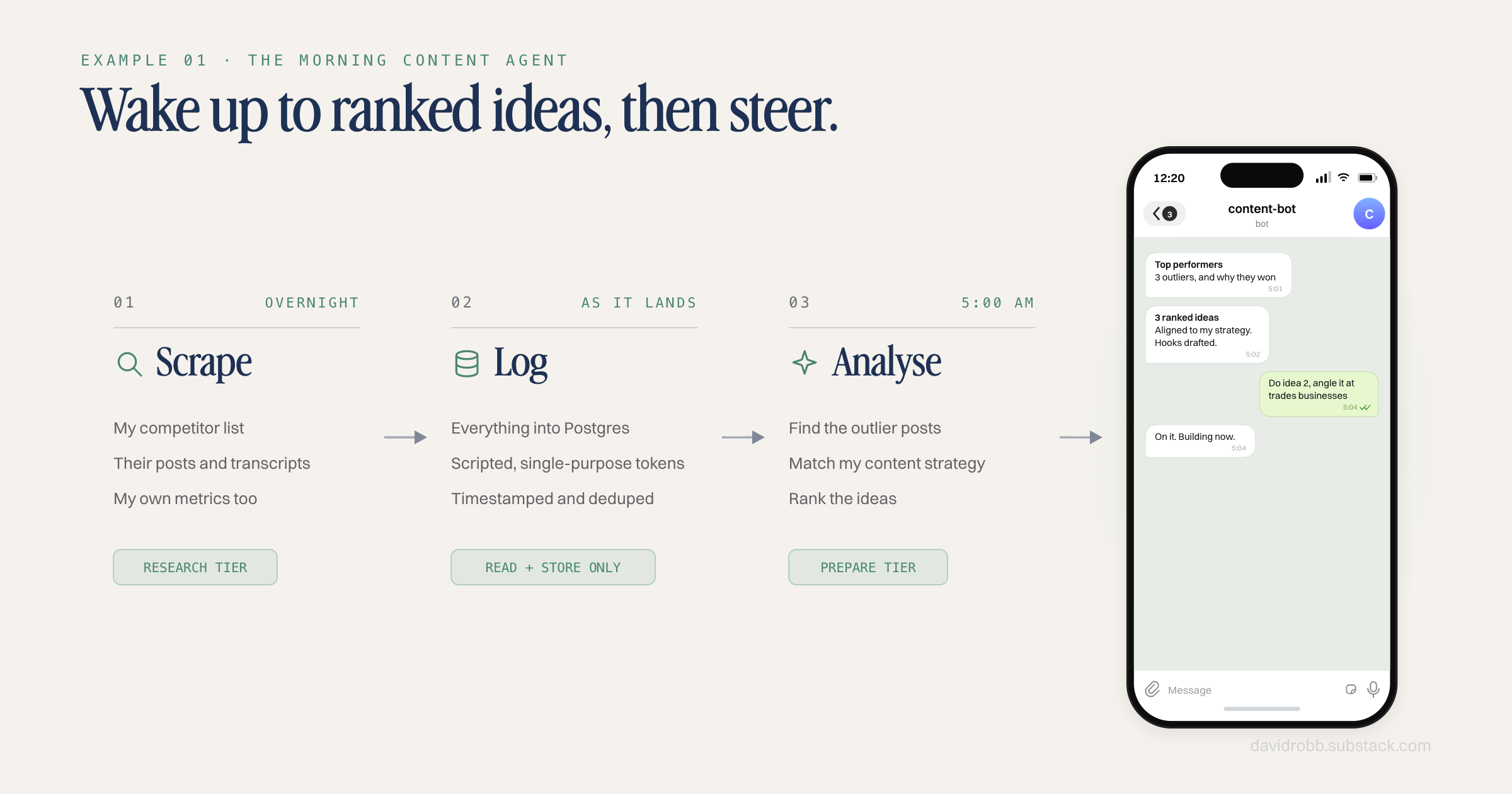
Use case: wake up to competitor intelligence + ranked content ideas, then ideate from the same chat thread.
At 5am, a compose job reads the fresh data + my content strategy and pushes a briefing to a dedicated Telegram bot (my social media manager).
The clever bit is that the brief seeds the chat session, so when I reply “do idea 2 but angle it at X,” I’m talking to the chat context that produced the ideas so the agent has the context.
How it runs: overnight, scheduled jobs scrape competitor posts + my own performance data to a cloud database.
Where it sits: the scrapers are Research-rung with scripted, single-purpose tokens. The ideation agent is Prepare-rung: it writes ideas and scripts into Git. Nothing posts anything. Publishing is me.
The skill part: the agent’s craft (what makes a good hook, how ideas get ranked, my voice rules) lives as a written skill in the brain, in markdown, versioned like everything else. When I improve the skill, every future morning gets smarter. That’s the compounding.
Example 2: the deliverable builder
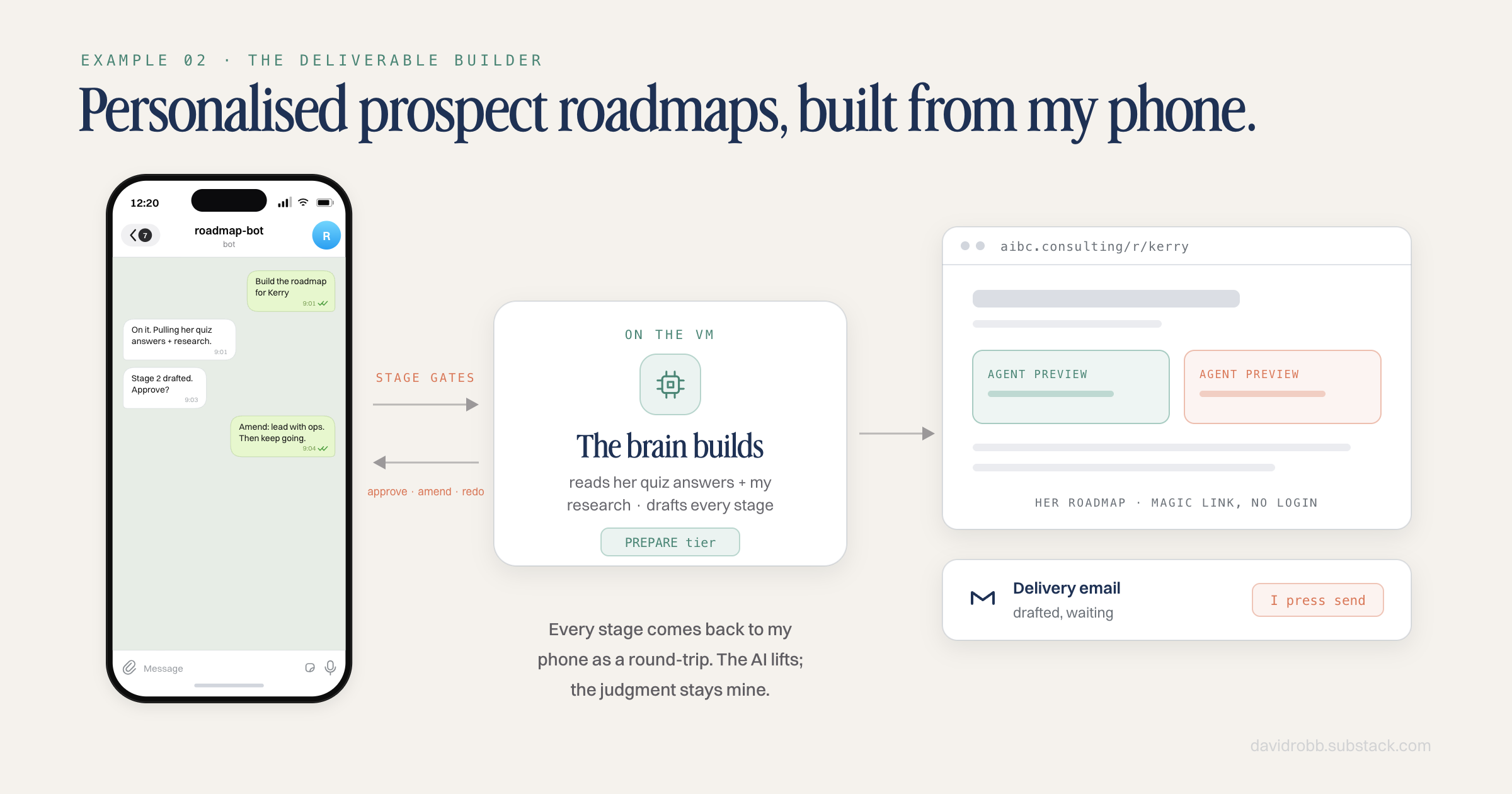
Use case: a lead fills in my quiz; I build their personalised AI roadmap from my phone, with the AI doing the heavy lifting.
I message it to start a prospect’s roadmap build. It reads the lead’s data from the database, drafts each stage, and every stage gate comes back to me as a Telegram round-trip: approve, amend, or redo. At the end it deploys the finished page and drafts the delivery email.
How it runs: a third dedicated Telegram bot (each agent gets its own thread on my phone, so contexts never bleed into each other).
Where it sits: Prepare-rung with human gates all the way up. It can build and draft; it cannot send. The email goes out when I’ve read it and pressed send myself.
The limited-MCP part: on my supervised machine, this workflow can use the full CRM and email tools. On the VM, it deliberately can’t. The unattended version got the draft-only email script and database reads, and the CRM writes stayed local.
You choose your own risk tolerance.
Both examples have this in common:
A well-defined skill (the how-to, written down in the brain).
Deliberately limited access (the narrowest tools that get the job done).
That combination is what makes agents trustworthy enough to run unattended. Not smarter models. Lovely, boring, well-shaped permissions and good written instructions.
With fully autonomous AI, managing risk is the name of the game. If you noticed that this is a lightweight Hermes build, you’re on the money.
I just stripped all the risk out of the self-modelling so agents don’t go rogue on skills they sign off themselves.
Where to start (if you made it this far)
A quick summary to getting this phone-agent-architecture online for yourself:
Get the server stood up and hardened (steps 1 and 2).
Connect your phone line(s).
Add one agent, test it locally until you trust it, promote it, repeat.
The first version of mine took a weekend. Every agent since has taken hours, because the flows were built and the platform was already there.
That’s the big payoff: the brain is built once, and the use cases compound as long as you’re running your business.
If you’d rather have this built for you, that’s exactly what I do for businesses. Send me a message on Instagram, or request a complimentary roadmap and I’ll give you a tailored preview of what your team of AI agents could look like.
https://www.mckinsey.com/capabilities/people-and-organizational-performance/our-insights/from-adoption-to-impact-three-horizons-of-ai-transformation